





KaYoTom D10 Global Walkie-Talkie User Guide
KaYoTom D10 Global Walkie-Talkie User Guide
Ⅰ. Quick Reference
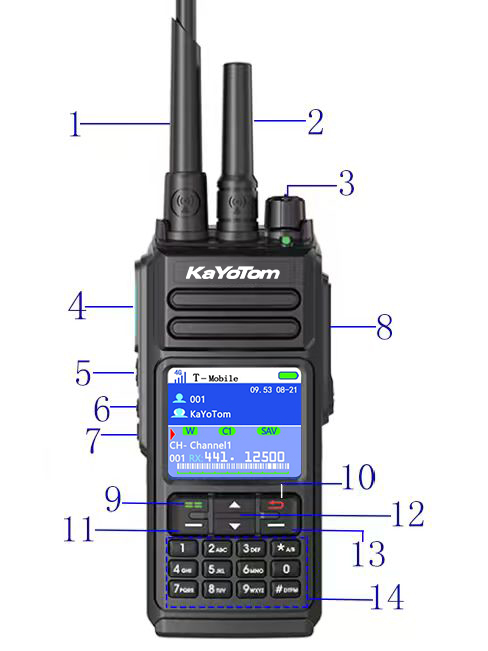
-
Assembled antenna for analog
-
Assembled antenna for network
-
Power / Volume
-
PTT for Network
-
PTT for Analog
-
& 7. & 11. Customized buttons by program
8. Universal connector of accessories
9. Menu / Confirm
10. Back / Hang up (long press to lock / unlock the keyboard)
12. Up / Down
13. Long press to collect frequency
14. Keyboard
-
“*” to switch POC & Analog
-
“#” to change the frequency mode of VFO or CHL
Ⅱ. Operating Reference
-
Insert the SIM card according to the shape of the slot.
Install the battery and press until you hear a “kada” sound, indicating correct installation. -
Turn the knob to the left.
You will hear a “da” sound, the LED will twinkle, and the radio will enter the homepage.
Ⅲ. Menu Function Details
▶ I. Working Modes
1. Public Network Mode
Communication is conducted via 4G / LTE cellular networks, allowing unlimited communication distance and enabling cross-city and cross-region calls.
This mode is ideal for logistics dispatching, security patrols, and engineering management where long-distance communication is required.
2. Private Network Mode
Communication is performed using traditional analog radio frequencies.
This mode is suitable for areas without public network coverage or for short-range local communication.
Commonly used in construction sites, warehouses, factories, and outdoor operations.
3. Hybrid Mode
Supports simultaneous standby of both public and private networks.
The system automatically switches to the optimal communication method based on current network conditions, improving communication reliability and efficiency.
4. Repeater Mode
Extends communication distance through a repeater station, enhancing signal coverage.
Suitable for large-scale operations or environments with complex terrain.
▶ II. Group & Member Management
Group Selection
Select the active talk group to enable multi-user group communication.
Member Selection
View and select specific members for individual calls or management operations.
▶ III. Channel Configuration
-
Channel Bandwidth
Sets the communication bandwidth, affecting voice clarity and interference resistance. -
Transmit Power
Adjusts the radio transmit power to balance communication range and power consumption. -
Receive CTCSS/DCS
Filters unwanted signals and receives only transmissions with matching CTCSS/DCS codes. -
Transmit CTCSS/DCS
Transmits a specific CTCSS/DCS code to avoid interference from other users on the same frequency. -
Frequency Offset
Sets the transmit and receive frequency offset, mainly used for repeater communication. -
Channel Alias
Assigns a custom name to the channel for easier identification and management. -
Frequency Hopping
Automatically switches among multiple frequencies to enhance anti-interference performance. -
Learning Code
Automatically learns and matches channel parameters from another radio via pairing.
▶ IV. Analog Settings
-
Squelch Level
Adjusts the squelch sensitivity to reduce background noise. -
Transmit Time-Out Timer (TOT)
Limits continuous transmission time to prevent accidental long transmissions and overheating. -
Analog Power Saving
Automatically reduces power consumption during standby in analog mode to extend battery life. -
Busy Channel Lockout
Prevents transmission when the channel is busy, avoiding communication conflicts. -
Frequency Step
Sets the minimum tuning step when adjusting frequencies. -
One-Touch Frequency Pairing
Quickly copies channel parameters from another radio with a single operation. -
Channel Clone Receive
Receives channel configuration data sent from another radio. -
Channel Clone Transmit
Sends the current channel configuration to other radios.
▶ V. Public Network Settings
-
Scenario Mode
Optimizes volume and microphone parameters based on different usage scenarios, such as outdoor, meeting, or vehicle-mounted use. -
Microphone Mode
Configures the operating mode of the built-in or external microphone. -
Power Saving Configuration
Adjusts power management strategies during public network communication. -
SIM Selection
Manually selects the SIM card to be used. -
SIM Auto Switching
Automatically switches to a backup SIM card when the current SIM signal becomes abnormal. -
Call Tones
Configures alert tones for call start, call end, and incoming calls. -
Contacts
View and manage public network contacts. -
Call Logs
View historical call records.
▶ VI. System Settings
-
Voice Prompt
Enables or disables system voice prompts. -
Backlight Settings
Adjusts screen brightness and backlight timeout. -
Key Beep Settings
Configures key operation feedback sounds. -
Headset Detection
Automatically detects an external headset and switches audio output accordingly. -
Restore Settings
Restores the device to factory default settings. -
Receive Priority
Prioritizes reception of a specified signal source when multiple signals are present. -
Repeater Volume
Adjusts the audio volume during repeater communication. -
Positioning Settings (If Supported)
Enables or disables positioning functions and configures related parameters.
▶ VII. Device Information
-
Account Information
Displays the status of the public network account. -
Software Version
Displays the current system software version. -
Module Version
Displays the communication module version information. -
IMEI
The unique device identification number. -
ICCID
The SIM card identification number. -
Application Version
Displays the current application version. -
Check for Updates
Checks for and installs system software updates. -
Analog Version
Displays the analog communication module version information.
User Guide Videos